Echo Link

“As an Amazon Associate I earn from qualifying purchases. this applies to all links on this post.”

Ironically the advent of smart speakers has led to an increase in the demand for “Hi-Fi” systems as consumers have sought out better quality sound. Amazon have responded by gradually improved the quality of their speakers and a couple of extra items, the Echo Link and the Echo Link Amp which is designed to power any standard pair of passive speakers. Today we will focus on teh Echo Link.
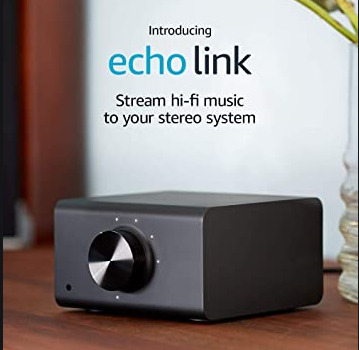
Amazon Echo Link

The Echo Link has no speak of its own and therefore needs to be connected to an Echo devices or controled by the Alexa app. Connect your Echo device and the Link in one ‘group’, then when you say “Alexa, play Johnny Cash”, then music will automatically begin playing from the stereo speakers connected.

You can connect yourEcho Link to your stereo and group with other supported Echo devices to play music throughout your home. Multiple digital and analog inputs and outputs provide compatibility with your existing stereo equipment.

Any links with an * by them are affiliated, which means get a product via this link and a contribution may be made to us.

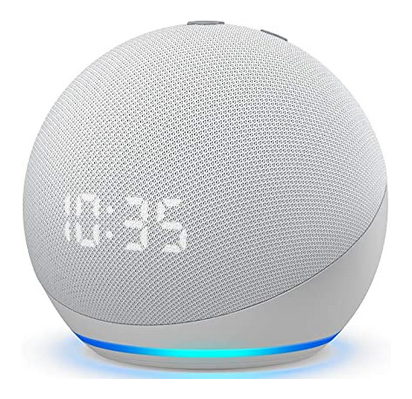
Echo Dot (4th Gen) Kids Edition

“As an Amazon Associate I earn from qualifying purchases. this applies to all links on this post.”

Amazon claim that this is their more popular smart speak and it is easy to see why. The updated 4th generation Echo Dot Kids edition comes in Panda form or Tiger form.

The Echo Dot will help kids learn and grow – as they can ask Alexa questions, set alarms, and get help with their homework. It is possible to unlock a world of kid-friendly content. The price includes a year of Amazon Kids+ gives them access to thousands of hours of kid-friendly Audible books, interactive games, and educational skills. After 1 year, your subscription will automatically renew every month starting at just $2.99/month plus applicable tax. You may cancel any time by visiting the Amazon Parent Dashboard or contacting Customer Service.

Amazon Echo Dot – Kids Edition

There are easy-to-use parental controls, where you can set daily time limits, filter explicit songs, and review activity in the Amazon Parent Dashboard. Kids can ask Alexa to play music, read stories, and call approved friends and family.

This kids edition comes with a 2-year worry-free guarantee – which in Amazon’s case means that if it breaks, you return it and Amazon will replace it for free.

Ask Alexa 10

“As an Amazon Associate I earn from qualifying purchases. this applies to all links on this post.”

If you are a regular reader of the posts on this site, then you know that one of the main uses our Alexa devices get used for are timers. A useful feature to know how long is left on your timer. “Alexa, how long’s left on my timer?” will solve that one for you.

Searching around on the internet the other day we also discovered that you can ask Alexa to “remind me” instead of “set a timer.” With Reminders, you can ask Alexa to alert you to anything of your choosing – even if it’s at a later date. For example, Amazon suggests you could remind yourself to pick up a parcel, or pay the electric bill. You can ask to be reminded at a particular date, day , or just time of day.

Timers can be assigned names, which will make them easier to manage. Especially when you have multiple timers going at the same time. To name a timer, you can just ask Alexa to set a timer using the name you want, like “Alexa, set a rice timer for…” Plus, you can cancel or check on these timers by name, as well, like “Alexa, how much time is left on the rice timer?”

You can also see a list of your active timers and reminders within the Alexa app.

Any links with an * by them are affiliated, which means get a product via this link and a contribution may be made to us.

All-new Echo (4th Gen) With premium sound

“As an Amazon Associate I earn from qualifying purchases. this applies to all links on this post.”

If I have one criticism of my Amazon Echo, it is the sound quality when cranked up.  Amazon has gradually improved the quality of their speakers over time and now the 4th Generation Echo comes with a premium speaker.

Amazon claims that it delivers clear highs, dynamic mids, and deep bass for rich, detailed sound that automatically adapts to any room.  One of the neat features that some people are not aware of is that you can combine your echo devices to deliver multi-room music, play synchronized music across Echo devices in different rooms. Or pair your Echo with compatible Fire TV devices to feel scenes come to life with home theater audio.

Of course your 4th Gen Echo will do all the usual Echo stuff:

  • Voice control your entertainment – Stream songs from Amazon Music, Apple Music, Spotify, SiriusXM, and more. Plus listen to radio stations, podcasts, and Audible audiobooks.
  • Ready to help – Ask Alexa to play music, answer questions, play the news, check the weather, set alarms, control compatible smart home devices, and more.
  • Smart home made simple – With the built-in hub, easily set up compatible Zigbee devices or Ring Smart Lighting products (coming soon) to voice control lights, locks, and sensors.
  • Connect with others – Call almost anyone hands-free. Instantly drop in on other rooms or announce to the whole house that dinner’s ready.
  • Designed to protect your privacy – Amazon is not in the business of selling your personal information to others. Built with multiple layers of privacy controls including a mic off button.

Any links with an * by them are affiliated, which means get a product via this link and a contribution may be made to us.
Echo Frames (2nd Gen)

“As an Amazon Associate I earn from qualifying purchases. this applies to all links on this post.”

As someone who has worn glasses / eyewear / frames / spectacles all my life. It has always confounded me why people would want to wear them when they didnt have to.

Now with Echo Frames I am beginning to understand. Whilst wearing your Echo Frames you can just ask Alexa to make calls, set reminders, add to your to-do lists, get the news, listen to podcasts, or control your smart home from anywhere.

In terms of audio the frames has “Open-ear audio” which directs sound to your ears while minimizing what others can hear. You get over 2 hours of talk time, Alexa interactions, and media playback over a 14-hour day. Or, up to 4 hours of nonstop listening on a full charge.

You can customize which notifications you receive from the contacts and apps on your phone that matter to you.

The Echo Frames are lightweight, splash-resistant, and compatible with most prescription lenses.

Echo Studio

“As an Amazon Associate I earn from qualifying purchases. this applies to all links on this post.”

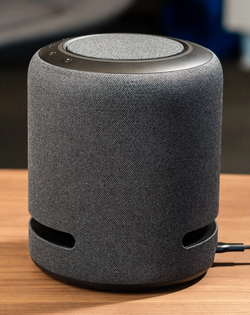
Amazon has continuously improved the performance of their speakers in their Echo range. The Echo Studio is currently Amazon’s biggest, loudest, Alexa speaker. It not only delivers stereo sound, but offers Dolby Atmos-compatible surround sound. 5 speakers produce powerful bass, dynamic midrange, and crisp highs. Dolby Atmos technology adds space, clarity, and depth. The clever technology will adapt the sound to any room – it automatically senses the acoustics of your space, fine-tuning playback for optimal sound.

Echo Studo – measures 8 inches tall.

As an Echo speaker, the Studio provides all of the same Alexa voice assistant features. The Echo Studio also features a built-in Zigbee home automation hub, which allows you to use the speaker to control compatible devices.

You can tream songs from Amazon Music, Apple Music, Spotify, Pandora, Tidal, and more. With Amazon Music HD, listen to 70 million songs in the highest quality audio formats available: HD, Ultra HD, and 3D formats like Dolby Atmos. Currently 3D music is only available with an Amazon Music HD subscription. For an immersive home theater experience, you can use Echo Studio with Fire TV Cube 1st Gen or 2nd Gen, Fire TV Stick 4K or Fire TV (3rd Gen).

Ask Alexa 9 – Reminders

“As an Amazon Associate I earn from qualifying purchases. this applies to all links on this post.”

Alexa* can be really useful for reminding you of things to do. I have a daily reminder to take my medication. It also acts as a reminder to check all the doors and windows before I head off to bed.

To set up a reminder is really easy. Through your Echo* device just say “Alexa, create a new reminder,” at which point Alexa will ask you what the reminder is for. Tell her what it is, such as “leave to pick up the kids from school,” “feed the cat,” or “ring Mom.” Alexa then asks you for the date and time. You can say something like: “Today at 1pm,” “Tomorrow at 4pm,” or “July 10 at 10am.”

You can also give all the details of the reminder in one shot, like: “Alexa, remind me to go to the dentist today at 2:30pm.” Reminders can be one off events or repeated like my medication. You can also add reminders via the Alexa App*. This is useful if you are away from home want to remind yourself when you get home or to remind someone at home to do something like “start the dinner”.

To check your reminders just say “Alexa, what are my reminders?” and she’ll read them out to you. Remove a reminder by saying, “Alexa, delete (adding the name of the reminder)” or delete all of the reminders by saying, “Alexa, delete all reminders.”

Any links with an * by them are affiliated, which means get a product via this link and a contribution may be made to us.
Audible

“As an Amazon Associate I earn from qualifying purchases. this applies to all links on this post.”

Need something to help you get to sleep?  Then you could ask Alexa* to read you a bedtime story. “Alexa, read a bedtime story”

The stories are short and family friendly.  However they are professionally narrated.  For a free audiobook ask “Alexa, read me a free audiobook”

Beware that these “free” service are linked into Audible* marketing so be careful what you say!

If you are already an Audible subscriber, remember “Alexa, read a bedtime story” to return to the book that you were previously listening to. 

As an Audible member, you have a choice of two main types of membership:

  • Audible Plus* is a monthly membership which includes access to unlimited streaming and listening from the Audible Plus Catalog. Look for the “included” tag and hit “play now” to instantly stream from the app. You can also save these titles to your Library or download to listen off-line. For $7.95 per month, you can listen all you want to Audible Originals, audiobooks, and podcasts including exclusive series. Thousands of titles are included so you’ll always have access to whatever the moment calls for. You are able to stream or download any title in the Plus Catalog so you can listen anytime!
  • Audible Premium Plus* includes everything in Audible Plus, with the added bonus of 1 credit per month to be used to redeem any title from our Premium selections. These titles are yours to keep forever! Premium Plus also unlocks a 30% discount for any additional content you purchase from the Premium catalog. This service starts at $14.95 per month plus applicable sales tax) will give you your fix of bestsellers and new releases. With a credit, you can pick any title in our premium selection to keep forever

There is a free trial available for most new memberships:

  • Audible Plus and Audible Premium Plus also offer a 30-day free trial*, available to most new members. When your trial is over, you’ll be automatically charged a monthly subscription fee.

Any links with an * by them are affiliated, which means get a product via this link and a contribution may be made to us.

All New Echo Show 10

“As an Amazon Associate I earn from qualifying purchases. this applies to all links on this post.”

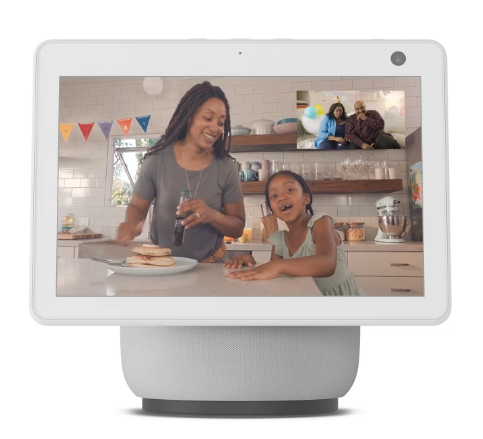
Coming soon is the new All-new Echo Show 10* (3rd Gen) | HD smart display with motion and Alexa available in Graphite Grey* or Diamond White*.

The 10” HD is designed to move with you, so that all you recipes, video calls and shows are always in view.  The speakers deliver premium directional sound.

As with other Alexa* devices you can control your Smart home through your Echo Show.  Set up compatible Zigbee devices or smart products without a separate hub. Ask Alexa to show you security cameras, control lights, and adjust thermostats.   All the other usual echoshow features are available and Netflix will soon be available.

Amazon Show 10 3rd Generation.
Echo Show 10 3rd Generation

Securely access the built-in camera to remotely monitor your home anytime with the Alexa app or other Echo Show devices.  Due to the motion device in your show you can look round your room.

So much entertainment – Ask Alexa to play your favorite shows, music, and podcasts from Prime Video*, Netflix (coming soon), Amazon Music*, Spotify, and more.

You can easily protect your privacy – Electronically disconnect the microphones and camera with one press of a button. Slide the built-in shutter to cover the camera. You can disable motion at any time.

Any links with an * by them are affiliated, which means get a product via this link and a contribution may be made to us.

Alexa Christmas

“As an Amazon Associate I earn from qualifying purchases. this applies to all links on this post.”

Whether you have an Alexa device or there is one sitting under the Christmas tree, there are a number of fun things that you can do this Christmas. Try out these Christmas commands:

“Alexa do you believe in Santa Claus?” Not sure the answer is PC.

“Alexa who’s on the naughty list?” Hopefully I am not on it.

“Alexa what do you want for Christmas?” Maybe it won’t be expensive.

“Alexa open the advent calendar”

“Alexa how many sleeps till Christmas”

“Alexa sing a Christmas carol”

“Alexa sing Jingle Bells”

“Alexa read ‘Twas the night before Christmas’”

“Alexa tell me a Christmas story”

“Alexa I wish it could be Christmas every day”

“Alexa Is Die Hard a Christmas movie?”

“Alexa what’s the best Christmas movie?”

“Alexa what’s the worst Christmas movie?”

“Alexa, can you name Santa’s reindeer”

Based on 32 fun things to ask Alexa by Rik Henderson