Alexa and Audible

“As an Amazon Associate I earn from qualifying purchases. this applies to all links on this post.”

Personally I prefer to physically hold a book. I have a Kindle but just have this thing about having a real object. Though I am seriously considering upgrading to a Kindle Oasis. I also like to think that I am doing a community spirited action by then donating finished books to my local charity shop. A few year back I go through a phase of downloading free books onto my kindle device to see whether my opinions would change but I always came back to the action of turning real pages.

I am a member of 3 book clubs and awhile back we were reading Michelle Obama’s book “Becoming“. I kindly lent me copy to a friend who promised to return it in time for me to read it before our book club meeting. They let me down and I had a week to rebuy the book and then read it on top and work and life in general. I realised that was unrealistic.

The option was to download an audio book. The playing time for the book was 20 hours, but you have the option of playing it slightly faster than normal and with over two hours commuting by car, I managed to get through most of the book on the move. I now have an Audible subscription.

Sign up for the free 30 day trial and you will get one book free, there are extras if you are already a Prime Member. Your monthly subscription then allows you to download 1 book per month at not extra cost. A selection of complimentary Audible Originals each month Complimentary digital newspaper subscriptions to the New York Times, Wall Street Journal and the Washington Post. Exclusive daily deals and a 30% discount on further audio book purchases.

Even without an Audible subscription you can access free book via you Alexa device. Just ask “Alexa, what’s free from Audible?” Maybe not the most up to date books, but you will certainly find classics. So give it a try today.
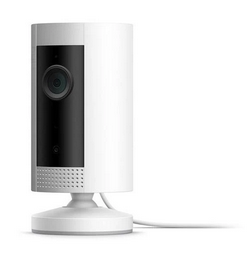
Ring Indoor Cam

“As an Amazon Associate I earn from qualifying purchases. this applies to all links on this post.”

The Ring indoor cam is a compact plug-in camera that lets you see, hear and speak to people and pets from your phone, tablet, or select Echo device. By connecting multiple indoor cams you can watchover you whole house.

Ring Indoor Cam - Copyright Ring
Ring Indoor Cam

It’s very to set up the Indoor Cam, place on a flat surface and mount on a wall and then plug it into a standard electrical outlet and connet to your Wi-Fi system. Its small design allow you to place and indoor cam almost anywhere in your home. With Live View, you can check in on your home any time through the Ring App.

For added peace of mind, pair with Alexa to help you keep an eye on your home.

Standard features include FREE instant notifications, live view and two-way talk. However Ring Protect allows you to review, save and share your videos. It saves all your videos to your Ring account for up to 60 days and photos for up to 7 days, so you can review what you missed and share what’s important.

If you wish you can take out an subscription service with Ring that will record all you videos and review what you might have missed for up to 60 days.

Connect Ring Indoor Cam with Alexa for hands-free home monitoring. When your Ring Indoor Cam detects motion, your Echo device will illuminate and make an announcement, so you’ll always know when someone’s there. And if you have an Echo Show or Echo Spot, you can also see, hear and speak to anyone captured on camera.

Ask Alexa 5

“As an Amazon Associate I earn from qualifying purchases. this applies to all links on this post.”

Adjusting the volume on your Alexa device or version of echo, whether its a dot, show or couldn’t be simpler. I started off with “Alexa volume up” or “Alexa volume down”. There are variations on this like “Alexa, turn up/down the volume” or “Alexa, louder/quieter”. I tend to go for the option that requires the fewest number of words to be spoken.

However you change set the volume more precisely with the “volume command”. I would use “Alexa volume 5” as opposed to a more formal “Alexa, set the volume to 5”. Maximum volume is 10 and depending on which Alexa device you are using you might have problems getting it turned back down again. For example when my Echo set is set to volume 10. I have to shout at the top of my voice and from not very far away to get it to comply. Most of the time it would be easier to manually turn the sound down.

In addition to volume you can adjust the way your music sounds by adjusting the bass and the treble. You can play around with commands such as “Alexa, turn up the bass/treble,” “Alexa, set the bass/treble to 6” or “Alexa, set the bass/treble to maximum/minimum.” To reset just say “Alexa, reset equalizer.”

Finally this week. Amazon have introduced a “Whisper” mode so that you can have some privacy or alternatively not wake up the whole house. Open the Alexa app on your Android phone or iPhone. Tap the menu button on the top left of the app.

Select “Settings.”
Tap “Alexa Account” at the top of the screen.
Choose “Alexa Voice Responses.”Enable the “Whispered Responses” mode. 

When you whisper to Alexa, it will whisper back. Remember than you have to be close by your Alexa device. At present this only works in English.

Echo Auto

“As an Amazon Associate I earn from qualifying purchases. this applies to all links on this post.”

With this clever little device you can add Alexa to your car. It works by connecting to the Alexa app on your phone and plays through your car’s speakers via auxiliary input or your smartphone’s Bluetooth connection. It comes with a “vent mount” you can check whether it fit your car here.

Echo Auto

With 8 microphones and far-field technology, the Echo Auto can hear above all the background noise inside your car, music, road noise, your vehicle ventilation and air conditioning system.can hear you over music, A/C, and road noise.

The voice controlled Echo Auto connect to the Alexa app on your phones to stream from Audible, Amazon Music, Apple Music, Spotify, SiriusXM, and radio stations with TuneIn and iHeartRadio or to check the news, make calls, mangage your calendar and much more.

In addition to check whether it compatible with your car vents, you can check whether its compatible with your phone here.

Ask Alexa 4 – Stopwatch

“As an Amazon Associate I earn from qualifying purchases. this applies to all links on this post.”

Asking Alexa to set a timer through my Amazon Echo Show is straightforward enough.

“Alexa set timer.” “Alexa set timer for 35 minutes”. When you the time is up, Alexa sets an alarm sound and you say “Alexa stop” and its all over with.

However I do a lot of work where I need to assign time to various projects. Normally I would use the stopwatch on my phone to do that for me, but I decided to try Alexa.

“Alex start stopwatch”, all good. However I could never figure out a way to stop the stopwatch so I went back to using my phone. If I asked Alexa to stop the stopwatch, Alexa just told me how long the stopwatch had been running for. So infuriating.

However thanks to the guys at Livewire. I know have it all sorted.

To start the stopwatch, you have three command options:

  • “Alexa, start stopwatch.”
  • “Alexa, open stopwatch.”
  • “Alexa, ask stopwatch.”

Use any of the above commands to check the stopwatch at any point.

To pause the stop watch and then resume it again.

  • “Alexa, ask stopwatch to pause.”
  • “Alexa, ask stopwatch to resume.”

Now the command that I found so elusive.

  • Alexa, ask the stopwatch to delete.

Alexa will then state the “Stopwatch ended at, and in my case it was 89 days 1 hour, 13 minutes and 6 seconds”. My life has now been transformed.

Portal

“As an Amazon Associate I earn from qualifying purchases. this applies to all links on this post.”

Portal from Facebook is essentially a video calling device. However it is adding features that will allow it to compete in the same space as products from Apple, Google and Amazon.

With built in Alexa it can do anything that an Amazon Echo device can do, including play your music from a number of providers including Amazon Music and Spotify.

Facebook Portal+  Copyright Facebook.

To use the video calling side of the Portal you will need a Facebook or Whats App account and you can speak to up to 7 people in a call.

The portal comes in 4 variants, the *8″ Portal Mini and the 10″ Portal are very similar, its just about the size. Portal TV essentially turns your TV in the display and finally there is the 15.6″ Portal+. The Portal+ has a better sound system that its smaller siblings and boasts a 4″ woofer.

Ask Alexa 3

“As an Amazon Associate I earn from qualifying purchases. this applies to all links on this post.”

If you have an Echo Show then you have the advantage of displaying images and video. I use my Echo Show to watch programs from Amazon Prime Video.

If you link your Facebook to your Alexa app you can personalise your wallpaper on your Echo Show. Open your Alexa app, go to the menu and select “Settings”, “Photos” and then log into your Facebook account.

“Alexa, what have you learnt today?” Today Alexa has been thinking about why there is so much chocolate around at Easter.

“Alexa, open Space Station” Will let you know when the International Space Station will pass over your location. The added bonus is that it will tell you other phenomena to look out for in the skies.

Whilst buying audiobooks can be expensive so why not ask “Alexa, read me a free audiobook”. There is a small selection to choose from each month. The other option is to download free books to your kindle or kindle app and have them read to you. Not the best way to listen but it is free.

For children you can ask “Alexa, read a bedtime story” and hear a professionally narrated bedtime story.

Amazon Smart Plug

“As an Amazon Associate I earn from qualifying purchases. this applies to all links on this post.”

Part of the beauty of owning an Alexa controlled device or even having the app on your Smartphone is the ability to control your lights and electrical devices round the home. A useful addition to you consider is the Amazon Smart Plug.

Amazon Smart Plug copyright www.amazon.com
Amazon Smart Plug

The Amazon Smart Plug will allow you to schedule lights, fans, and appliances to turn on and off automatically, or to control them remotely when you’re away, or at your command when you are home. Set the lights to come on at dusk and off at bedtime when you are away on vacation. Coming home late, turn them on so the house is lit on your arrival. Forgot to switch the lounge light on when you are in bed, simple just ask Alexa to switch it off.

Ask Alexa 2

“As an Amazon Associate I earn from qualifying purchases. this applies to all links on this post.”

One of the fun things about owning an Echo is the numerous questions that you can ask.

“Alexa, what have you learnt today?” Today Alexa has been thinking about ways of helping to deal with writers block. The rest of us are worried about catching Covid 19.

“Alexa, will you catch Covid 19?” “According to the CDC/NHS we do not know how it is spread from person to person”.

If you are self-isolating buying audiobooks can be expensive so why not ask “Alexa, read me a free audiobook”. There is a small selection to choose from. The other option is to download free books to your kindle or kindle app and have them read to you. Not the best way to listen but it is free.

Amazon Echo Flex

“As an Amazon Associate I earn from qualifying purchases. this applies to all links on this post.”

The Amazon Echo Flex is essentially an additional listening device that you can add around your home so that you can access the various SMART features of Alexa.

You can turn on lights, adjust thermostats, lock doors, and more with compatible connected devices. What it will not do is act as a replacement for a Smart Speaker as the tiny speaker is not designed for music playing though you could connect a speaker via 3.5mm aux, Bluetooth, or setting your Preferred Speaker in the Alexa app.

Amazon Echo Flex
Amazon Echo Flex

You can connect a nightlight or motion sensor attachment (each a $15 extra) via a USB port.